s&box goes free-to-play on December 10: what's in update 26.11.10
Update 26.11.10 ("New Moves") sets the free-to-play date and previews a menu that finds games through the Steam Workshop. It also brings AnimGraph 2, built-in voice chat and a host relay for peer-to-peer lobbies.
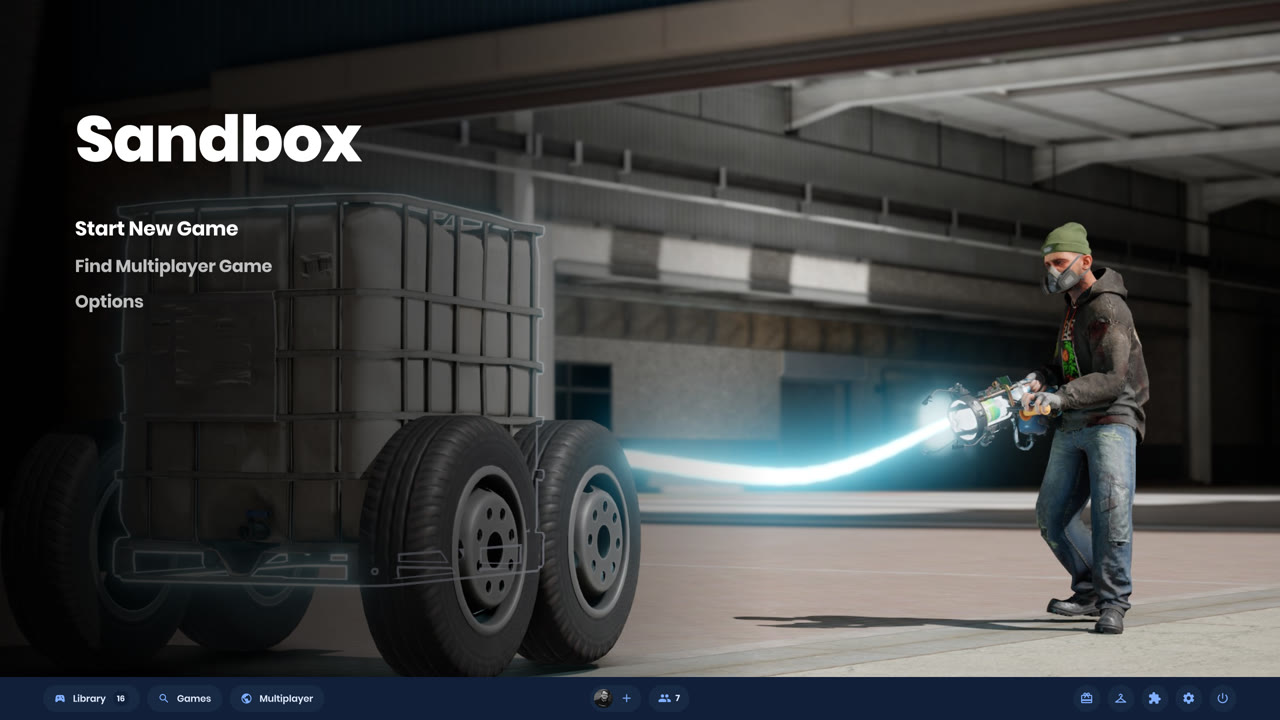
Facepunch's November 10, 2026 update for s&box (26.11.10, published on sbox.game/news/new-moves/ as "New Moves") announces the date for s&box's free-to-play switch and ships major changes to game discovery, animation, networking, voice chat and asset compilation. This unofficial summary covers what creators and server operators need to prepare before December.
Free-to-play on December 10, and the Workshop menu
Facepunch confirmed that s&box will go free-to-play on December 10, 2026. Anyone who owns s&box before December 10 will receive exclusive Steam inventory items that will not be obtainable after the switch.
Alongside the date, 26.11.10 introduces a rewritten platform menu that moves game and map discovery to the Steam Workshop. When you launch s&box with the new menu enabled, you either land in Sandbox's main menu or go straight into the main menu of the last game you played, and developers can take over that full screen for their own game. The new menu is a preview in 26.11.10 (enabled under Settings -> Game -> "New" Menu) and Facepunch aims to make it the default in the next major update.
For game developers and mappers, the post carries a direct warning: once the new UI becomes the default, discovery runs through the Steam Workshop, and any game or map that has not been published to the Workshop will not be discoverable. If you run a dedicated server or maintain a game mode, republish both your game package and its map packages to the Workshop now.
Host relay and built-in voice chat
In peer-to-peer lobbies, s&box uses full-mesh P2P where every player sends updates directly to every other player. When NAT rules, VPNs or ISP restrictions blocked a direct peer connection between two players, client-side movement could fail to sync and one player could appear stuck at spawn while everyone else moved normally. In 26.11.10, the lobby host automatically relays updates between peers that cannot connect directly.
Voice chat is now built into the platform by default for multiplayer games, including games published without Voice components (games that already place their own Voice components keep using them). A voice overlay on the right side of the screen shows up to eight active speakers, and developers can configure or hide it under the Voice Chat section of their project's platform settings.
On the audio side, voice chat adds automatic gain control (AGC) with a 100 Hz high-pass gate to level out quiet and loud microphones, a Game Volume slider next to Incoming Voice Volume, a one-click mute toggle for sending, receiving and the overlay, and a Streamlined Push to Talk option that keeps slow-waking microphones (such as Bluetooth headsets) open between presses without transmitting. Acoustic simulation also gained Doppler pitch shifts, doorway and corner propagation, wall muffling and room-matched reverb.
AnimGraph 2 replaces AnimGraph 1
AnimGraph 2 replaces AnimGraph 1 with a native runtime built on Esoterica and a new authoring toolchain. Existing AnimGraph 1 assets continue to run, while the old APIs are deprecated and the old graph editor is now read-only. In AnimGraph 2, Skeletons and AnimationClips are standalone assets with shared preview and undo history, bone mask authoring, additive animation, motion extraction and live graph debugging with hot reload. Graphs can also attach sub-graphs at runtime via External Graph nodes (Renderer.Animation.ExternalGraphs.Connect( "action", ActionGraph )).
Animation events on AnimGraph 2 clips can now be typed C# classes instead of string names with untyped parameters. You define a sealed subclass of AnimationEvent with [Property] fields, place it on an Animation Events track in the clip editor, and implement Component.IAnimationEvent (void OnAnimationEvent( AnimationEvent data )) on any enabled component on the renderer's GameObject or one of its parents to receive it without manual event subscriptions.
Faster builds, text batching and air strafing
Editor startup and initial project builds now use a shared managed content pipeline that compiles assets in parallel within a single process. In Facepunch's benchmark on their core assets, a clean build dropped from 18 minutes to under 4 minutes and peak memory dropped from roughly 30 GB to 10 GB. Idle per-frame engine allocations were reduced from several kilobytes to nearly zero, TextRenderer labels using the default blend mode now batch through the sprite batcher (cutting a world-text test scene from 25 ms to 3 ms), and F11 Dev Tools added a timeline profiler under the rendering tab.
Finally, PlayerController gained native options for Air Strafing (with Air Friction defaulting to 0 when enabled for bunny hopping and surfing), configurable duck and un-duck easing times, a sprint-jump forward speed multiplier, Hold to Jump, and removal of mouse spring dampening on player aim animations so fast 180-degree turns no longer lag behind the weapon. Read the full post at sbox.game/news/new-moves/.
All news · Guides · Follow @sboxlist on Instagram and TikTok.
Comments
No comments yet.